Category: Cloud

  • Upgrading Oracle Autonomous AI Database with Cross-Region Data Guard from 19c to 26ai

    Upgrading Oracle Autonomous AI Database with Cross-Region Data Guard from 19c to 26ai

    I hear the Autonomous Database upgrade from 19c to 26ai is as easy as a click of a button. Let’s see what is involved and how long it takes.

    As part of ongoing platform modernization efforts, upgrading to the latest long-term support release is essential. I initiated the upgrade of my Autonomous AI Database, ABC19CPRD, moving from Oracle Database 19c to 26ai.

    Currently, the environment is architected for high availability and disaster recovery across two regions:

    Primary Instance: Located in US Midwest (Chicago).

    Local Protection: I also maintain a backup-based local peer for an extra layer of redundancy.

    Remote Standby: A peer database, ABC19CPRD_IAD, is active in US East (Ashburn) using Autonomous Data Guard.

    As you can see, the database is currently 19c, and Oracle shows the “Schedule upgrade to 26ai” option to initiate the upgrade.

    One interesting detail in the OCI console is that the upgrade must be orchestrated from the source. If you attempt to schedule the upgrade from the standby instance in Ashburn, OCI reminds you that upgrades can only be scheduled on the Primary database.

    Once I navigated back to the Chicago primary, the process was straightforward:

    Warning Awareness: OCI provides a clear warning that the database will experience a few minutes of downtime and, importantly, that attached standby databases will be upgraded along with the source.

    I chose the “Schedule upgrade to 26ai” option and opted for the “Earliest available schedule” to get started immediately.

    Oracle provided the schedule within a few minutes, and it is supposed to start at 11:00 PM UTC. The primary database state transitioned to “Updating”.

    The same was visible on the standby side as well.

    Looking at the Work Requests, I can see the operation “Update Autonomous AI Database scheduled time for DB upgrade to 26ai” is currently in progress.

    The upgrade on the primary instance, ABC19CPRD, was the first to move, starting at 11:00:14 PM UTC. It successfully finished its version transition just four minutes later, at 11:04:03 PM UTC.

    The version information in the OCI Portal was updated to show 26ai.

    A query of the banner in V$VERSION confirms the new identity: Oracle AI Database 26ai Enterprise Edition Release 23.26.1.1.0.

    A few minutes after the primary upgrade, standby still shows 19c. Scheduled 26ai upgrade time is the time I scheduled for the primary upgrade.

    After a few minutes, the standby upgrade kicked off.

    I am skeptical of the standby upgrade time – it started and finished immediately according to the work request, but the standby had “Updating” status at the top for 4+ minutes.

    After about 15 minutes of total elapsed time from start to finish, the environment was fully upgraded to 26ai.

    Both the Chicago and Ashburn consoles now proudly display Database Version: 26ai.

    Oracle also initiated the automatic backup shortly after the primary upgrade.

    This is one issue when people use the version in the database name – now my 26ai database is named 19c! Luckily, Autonomous offers an easy way to change the display name. It only changes the display name; the database name remains the same.

    But my autonomous data guard standby instance still has the old display name, and there is no option to change its name.

    That’s it. 15 minutes to upgrade the Autonomous AI Database Serverless from 19c to 26ai.

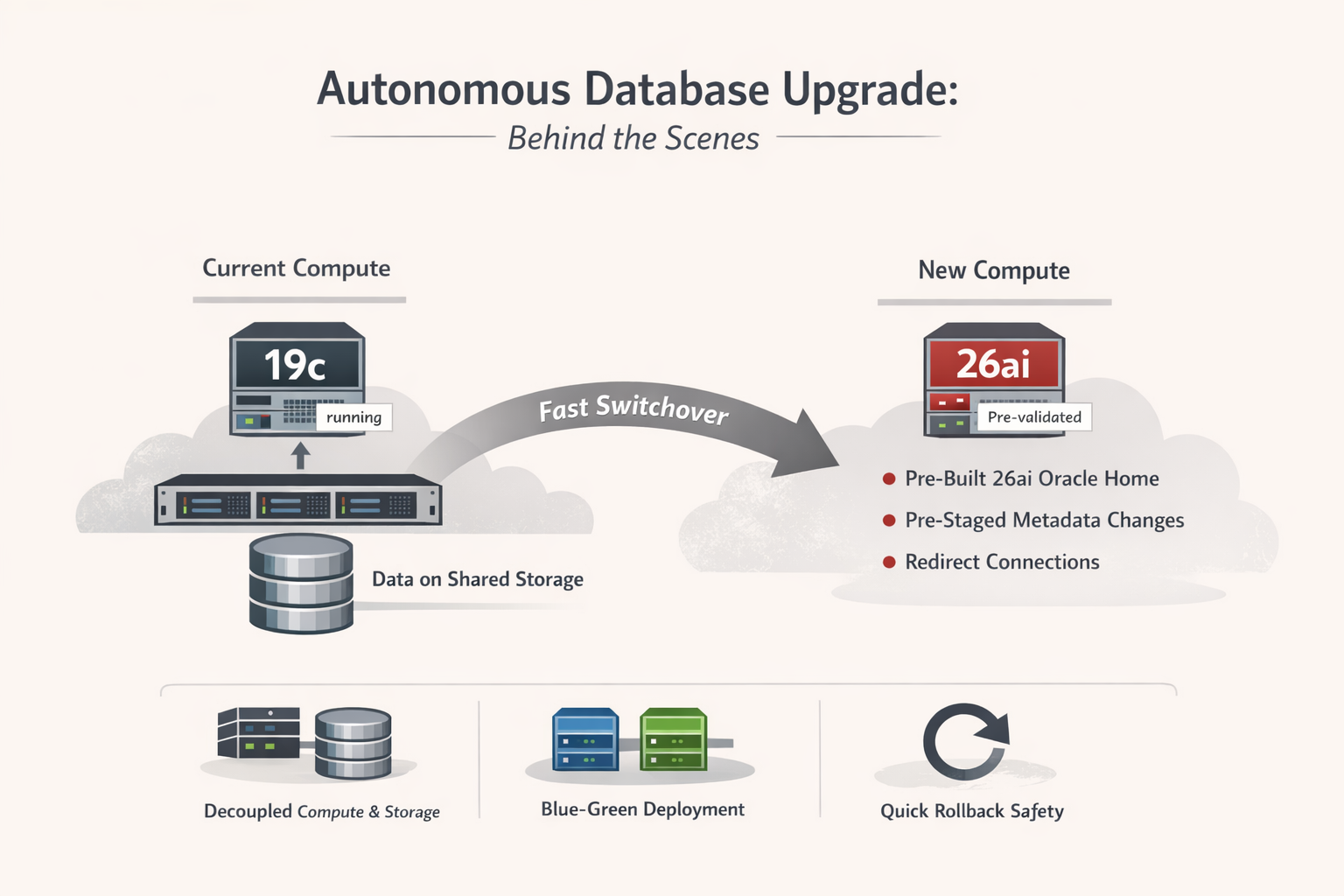
    Behind the Scenes: Why the Upgrade Is So Fast

    What makes the Autonomous Database upgrade from 19c to 26ai finish in minutes is that it is not a traditional in-place database upgrade.

    In Autonomous Database, compute and storage are decoupled. The database files live on Exadata storage, while the database engine runs on disposable compute. During an upgrade, Oracle does not upgrade binaries in a running database. Instead, Oracle switches the database to a new, pre-provisioned compute stack that is already running the 26ai engine.

    The 26ai Oracle Homes are built, patched, and validated ahead of time across the Autonomous fleet. By the time the upgrade starts, the target engine is already live and tested. The upgrade window is primarily spent draining connections, switching compute, and running final health checks.

    Data dictionary and internal metadata changes are also handled differently. Many transformations are pre-staged or deferred, and several 26ai capabilities are enabled only when first used. This avoids the long-running dictionary upgrade steps that dominate traditional upgrades.

    In short, the speed comes from architecture, not faster scripts. Autonomous Database upgrades work because Oracle controls the full stack and treats the database engine as a replaceable component rather than something that must be upgraded in place.

    Rollback and Alternate Upgrade Options

    Once a scheduled upgrade is initiated in Autonomous Database, it cannot be paused or cancelled, and there is no self-service downgrade option after completion. However, Oracle does provide a limited rollback window (via Oracle Support) if issues are identified shortly after the upgrade, which is possible because the upgrade does not modify data in place. For customers who want to reduce risk further, Oracle also supports full clone and refreshable clone–based upgrades. A refreshable clone allows you to validate application behavior on 26ai while continuously syncing data from the 19c primary, making it ideal for pre-production testing. A full clone, on the other hand, creates a one-time copy that can be upgraded independently and used for functional validation or performance testing before committing to the production upgrade. These options provide a practical safety net when upgrading business-critical workloads.

  • ExaDB-XS vs ExaDB-D – When to choose ExaDB-XS

    Let’s compare Exadata Database Service on Exascale Infrastructure (ExaDB-XS) and Exadata Database Service on Dedicated Infrastructure (ExaDB-D) and review how to choose between these services. Both Oracle Database services run on powerful Exadata hardware within the Oracle Cloud Infrastructure (OCI) public cloud, but they differ in their underlying infrastructure model and characteristics.

    • Exadata Database Service on Dedicated Infrastructure (ExaDB-D):
      • Runs your Oracle databases on dedicated Exadata database servers and storage servers physically allocated solely to you within an OCI region. Think of it as single-tenant at the hardware infrastructure level, providing maximum isolation in the public cloud. You start with two database nodes and three storage servers.
    • Exadata Database Service on Exascale Infrastructure (ExaDB-XS):
      • Runs your Oracle databases on the shared infrastructure of Exadata compute and storage resources within OCI. Exascale architecture decouples compute and storage for greater flexibility and elasticity. Consider it multi-tenant at the hardware infrastructure level, though your VMs provide logical isolation. Instead of dedicated database servers and storage, you get a dedicated Exadata cluster with dedicated CPU and Storage.

    2. Key Differences and Decision Points:

    FeatureExaDB-XSExaDB-DDecision Driver
    InfrastructureShared, multi-tenant pools of Exadata compute & Exascale storageDedicated, physically isolated Exadata compute & storage serversIsolation: Choose D for maximum physical isolation. XS offers VM-level isolation on shared hardware.
    IsolationLogical isolation via VM clusters on shared hardwarePhysical isolation with dedicated serversCompliance/Security: D meets stricter requirements for physical separation.
    ScalabilityHyper-elastic; fine-grained scaling of ECPUs & Exascale Vault storageScales ECPUs/OCPUs dynamically; infrastructure scales by adding dedicated serversElasticity: XS offers more granular scaling, especially for storage, and potentially faster VM provisioning.
    Minimum SizeLow entry point (starts with 8 ECPUs, 300 GB storage)Higher entry point (requires minimum server configuration, 2 DB Servers + 3 Storage Servers)Cost/Starting Small: XS is more cost-effective for smaller workloads or starting new projects.
    Cost ModelGenerally lower entry cost; pay-per-use compute & storageHigher entry cost for infrastructure; pay-per-use computeBudget: XS provides Exadata power at a potentially lower cost, especially initially.
    PerformanceHigh Exadata performance on shared infra; benefits from Exascale arch.Predictable high Exadata performance on dedicated resourcesPredictability: D offers the most predictable performance baseline, free from potential “noisy neighbors”.
    Storage ManagementAbstracted via Exascale Vault; simplified scalingManaged via ASM across dedicated storage serversSimplicity: XS simplifies storage management (no need to manage ASM allocation across servers).
    MaintenanceUnderlying host maintenance may require scheduled VM restart/migrationMaintenance scheduled for the dedicated systemControl: D may offer more perceived control over infrastructure maintenance windows (though both managed by Oracle).
    Key FeaturesExascale architecture (direct I/O, RDMA), efficient thin cloning. Supports DB 23ai.Established platform, supports DB versions 19c and 23ai.Specific Needs: XS is ideal for leveraging efficient clones. Check DB version support for XS if not using 23ai.
    VM PortabilityHigh; VM filesystems on shared storage enable easier migrationLower; VM filesystems traditionally tied more closely to local compute resourcesFlexibility: XS architecture facilitates easier movement of VMs across underlying physical hardware.

    3. When to Choose ExaDB-XS (Exascale Infrastructure):

    • Cost Sensitivity: You need the power of Exadata but require a lower entry cost than dedicated hardware. Consolidate various smaller databases that demand high performance.
    • Elasticity is Key: Your workload is variable or unpredictable, and you need the ability to scale computing resources up or down quickly and granularly.
    • Starting Small: You are deploying a new application or migrating smaller workloads and want to start with a minimal footprint and grow later.
    • Development & Testing: You need to rapidly provision/de-provision environments and leverage efficient database cloning (thin clones) for multiple developers or test cycles.  
    • Simplified Storage Management: You prefer an abstracted storage layer (Exascale Vault) that does not require managing ASM allocations across specific storage servers.
    • Physical Isolation Not Mandatory: Logical isolation provided by VMs on shared infrastructure meets your security and compliance needs.

    4. When to Choose ExaDB-D (Dedicated Infrastructure):

    • Maximum Isolation Required: Your security policies, compliance regulations (e.g., certain financial or government standards), or internal governance demand physically isolated hardware.
    • Utmost Performance Predictability: You need guaranteed performance levels based entirely on your workloads running on dedicated, non-shared resources.
    • Large-Scale Consolidation: You consolidate numerous or very large databases onto a powerful, isolated platform. If the database storage exceeds 90TB, ExaDB-D would be more cost-effective, irrespective of the ECPUs required.
    • Migrating Existing Exadata: Moving a significant on-premises Exadata workload to the cloud requires equivalent dedicated resources.
    • Specific Compliance: Regulations explicitly mandate single-tenant hardware, even within the cloud.

    5. Price Comparison

    With ExaDB-D, you get dedicated usable storage of 240 TB. This allows you to allocate up to 192 TB for databases (without local backup) or up to 96 TB with local backup. Taking just the storage vault cost for 90TB in ExaDB-XS almost matches the infrastructure cost for 2 database servers (up to 1520 ECPUs) and 3 storage servers (up to 240 TB usable space). So you cannot determine if ExaDB-D or ExaDB-XS will be price-performant just by looking at the ECPU requirement.

    Let me show this with two sample Bill of Materials (BoM).  Since the blog template width is limited, here are the SKU descriptions used in the cost estimate.

    SKUExadata Database Service – ExaDB-XS
    B109355Oracle Exadata Exascale RDMA Compute Infrastructure (ECPU Per Hour)
    B107951Oracle Exadata Exascale VM Filesystem Storage (Gigabyte (GB) Storage Capacity Per Month)
    B107952Oracle Exadata Exascale Smart Database Storage (Gigabyte (GB) Storage Capacity Per Month)
    B109375Oracle Exadata Exascale Additional Flash Cache (Gigabyte Per Hour)
    B109357Oracle Exadata Exascale Database ECPU – BYOL (ECPU Per Hour)
     SKUExadata Database Service – ExaDB-D
    B110629Exadata Cloud Infrastructure – Storage Server – X11M (Hosted Environment Per Hour)
    B110627Exadata Cloud Infrastructure – Database Server – X11M (Hosted Environment Per Hour)
    B110632Exadata Database ECPU – Dedicated Infrastructure – BYOL (ECPU Per Hour)

    Table 1: Large database storage footprint (90TB). ECPU allocation is very small, but ExaDB-XS is still expensive, and going with ExaDB-D makes it cheaper to scale.

    Part SKUPart QtyInstance QtyUsage QtyUnit PriceMonthly Cost
     ExaDB-XS     $ 11,650.48
    B109355161730 $0.025000 $292.00
    B10795128011 $0.042500 $11.90
    B1079529000011 $0.115600 $10,404.00
    B10937501730 $0.000500 $          –  
    B109357161730 $0.080700 $ 942.58
     ExaDB-D        $ 11,539.26
    B11062931730 $2.903200 $6,358.01
    B11062721730 $2.903200 $4,238.67
    B110632161730 $0.080700 $942.58
    Difference-1%

    Table 2: Smaller storage footprint (30TB). Plenty of ECPUs allocated on ExaDB-XS, still, it is cheaper than ExaDB-D.

    Part SKUPart QtyInstance QtyUsage QtyUnit PriceMonthly Cost
     ExaDB-XS     $23,233.12
    B1093552561730 $0.025000 $4,672.00
    B10795128011 $0.042500 $11.90
    B1079523000011 $0.115600 $3,468.00
    B10937501730 $0.000500 $          –  
    B1093572561730 $0.080700 $15,081.22
     ExaDB-D        $25,677.90
    B11062931730 $2.903200 $6,358.01
    B11062721730 $2.903200 $4,238.67
    B1106322561730 $0.080700 $15,081.22
    Difference10%

    In Summary, both ExaDB-XS and ExaDB-D offer the core performance and availability benefits of Exadata within OCI.

    • Choose ExaDB-XS for elasticity, lower entry cost, smaller storage requirement and simplified management on shared infrastructure when physical isolation isn’t the top priority.
    • Choose ExaDB-D for maximum isolation, larger database storage, performance predictability, and control on dedicated hardware, typically for mission-critical, large-scale, or highly regulated workloads.